


Technology & Software Trade Show Displays
Real LitBlocks displays. Industry-inspired possibilities.
Give people a reason to stop before you ask them to watch a demo. Backlit technology trade show displays pair a clear brand message with a screen-based presentation, helping software, IT and SaaS teams explain what they do without filling the booth wall with interface screenshots.

An office welcome that carries your brand
A freestanding 3.3ft lightbox brings a launch or recruiting message into an everyday office reception, without taking over the room.
Display shown: SEGO LitBlocks - 3.3ft. Double-Sided Lightbox DisplayIllustrative concepts with fictional brands, based on actual LitBlocks product configurations. These are generated examples, not customer installation photos. People, furniture, screens and props are illustrative; check each product’s included components and optional accessories.
Which display fits your space?
For one software demonstration in a 10x10 booth, start with a 10ft lightbox with a TV mount. For two simultaneous presentations in a 10x20 space, compare a 20ft dual-TV wall. If your team presents on laptops, a simple illuminated wall and separate welcome counter may be a better fit.
See the possibilities
More technology & software display examples
Technology teams meet customers in more places than a software expo. These examples span office reception, IT reseller events, campus recruiting and agricultural technology, with different messages and display formats for each audience.

IT services at a regional conference
A TV-ready wall pairs a concise service message with a practical screen demonstration.
Display shown: SEGO LitBlocks - 10ft X 7.4ft Lightbox with TV Mount
Developer recruiting on campus
A compact illuminated counter creates a branded conversation point without requiring a large booth.
Display shown: MLB60 Three-Sided Backlit Counter Display
Agricultural technology beyond the office
A wide graphic wall introduces an applied technology story to a specialist trade show audience.
Display shown: SEGO LitBlocks - 9.8ft Double-Sided Lightbox Display
Two demo zones at a technology event
A 20ft dual-TV wall keeps the brand message central while giving two presentations their own screen positions.
Display shown: SEGO LitBlocks - 20ft X 7.4ft Lightbox Display with TV Mounts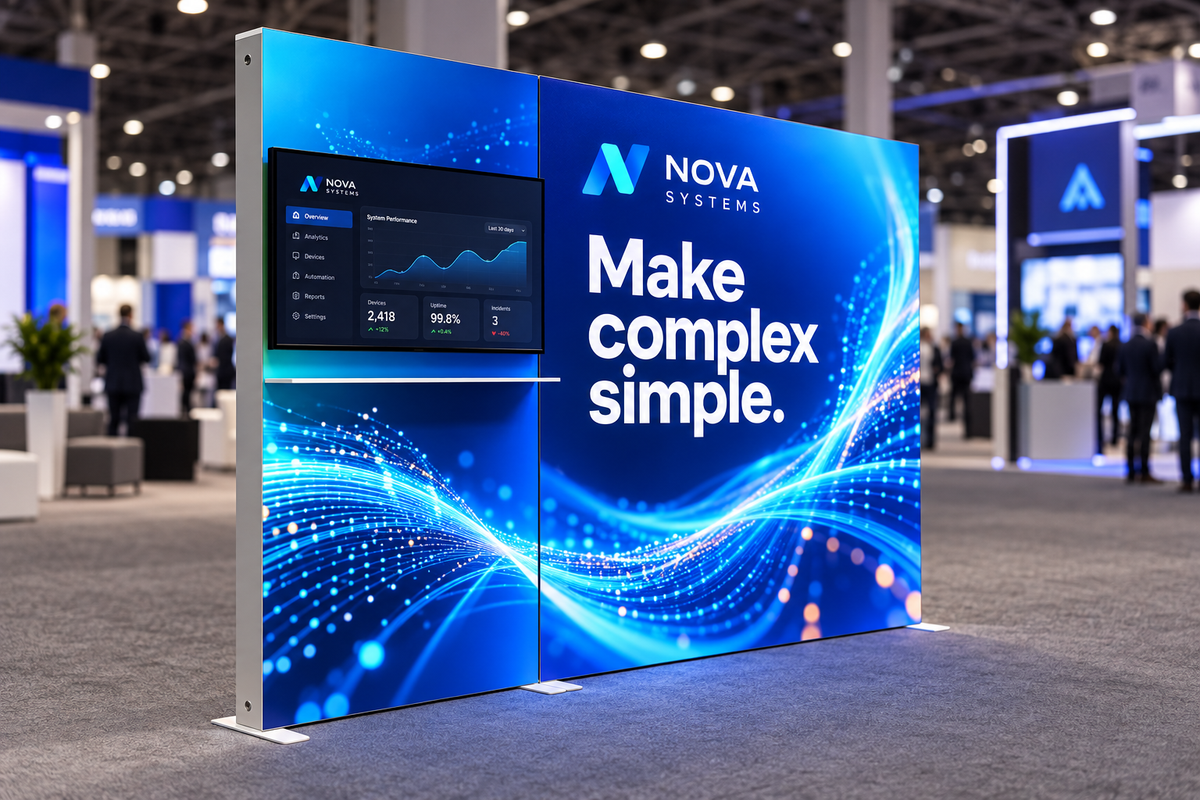
A clear message beside a live demo
Bold blue artwork leaves a dedicated area for the existing TV and shelf, with the main message on the larger panel.
View the display shown →Design around the way you meet people
Software demonstrations
Position the screen so a small group can watch from inside the booth. Leave space for the presenter and keep the entrance clear.
Product launches
Put one short benefit on the fabric wall. Use the screen for the workflow, animation or before-and-after story that needs more explanation.
Partner events and recruiting
Reuse the display hardware with campaign-specific graphics. Check the exact frame size and panel layout before ordering another graphic set.
Find the right display for your next event or space
Start with the job the display needs to do, then compare the exact dimensions, graphic options and included components.
SEGO LitBlocks - 10ft X 7.4ft Lightbox with TV Mount
A focused starting point for a single product demonstration in a standard 10x10 space.
See sizes and options →SEGO LitBlocks - 20ft X 7.4ft Lightbox Display with TV Mounts
Two presentation zones let different teams or products share a 20ft branded wall.
See sizes and options →MLB60 Three-Sided Backlit Counter Display
A separate greeting surface gives staff a place to start conversations away from the screen.
See sizes and options →SEGO LitBlocks - 9.8ft Double-Sided Lightbox Display
A wide graphic backdrop suits teams that prefer laptop presentations or conversations over mounted screens.
See sizes and options →Artwork that works with backlighting
Lead with the problem your software solves, then make the logo and next step easy to find. Keep important words away from panel seams and the monitor area. Use a short captioned demo loop so the story still works when visitors cannot hear the audio. Avoid tiny screenshots on the printed fabric; they become visual noise from the aisle.
Build to the correct template using the LitBlocks artwork guidelines and backlit graphic design guide. Need a new campaign on an existing frame? See the replacement graphics guide.
Plan the complete space
Decide how many demonstrations will run at once before choosing a booth width. Check your monitor’s weight, size and VESA pattern against the selected mount, and plan power and cables for both the lighting and electronics. The 10ft TV kit includes a compatible mount, but the monitor and the shelf shown in some renderings are not included in the standard kit.
Technology & software display questions
Which display works for a 10x10 software booth?
The 10ft lightbox with TV mount is a useful starting point for one screen-based demo. Choose a 9.8ft lightbox wall when your team presents from laptops and wants more uninterrupted graphic space.
Are the screens included?
No. The linked TV-ready kits include compatible mounts, not TVs or monitors. Confirm the selected kit’s mount specifications and any optional accessories before ordering.
Can two teams present at the same time?
A 20ft dual-TV wall provides two screen positions. Plan enough space for both presenters and their visitors, and check your event’s booth and aisle requirements.
Can we change the campaign later?
Yes. These displays use replaceable SEG fabric graphics. Order graphics matched to the exact frame size and configuration; a new campaign does not require a new frame when the existing hardware remains suitable.
Bring your brand into the picture
Tell us your display location, available space and campaign goals. We can help you choose a configuration and prepare artwork for the actual panels.
Plan your display Explore graphic design servicesKeep exploring
Browse the full design gallery or compare ideas for other industries.