


Manufacturing & Industrial Trade Show Displays
Real LitBlocks displays. Industry-inspired possibilities.
Help visitors understand what you make and why it matters. Industrial trade show displays can combine a strong product image with process video, leaving the exhibit team free to explain the technical details in conversation.

A process demonstration in a working showroom
A 10ft TV-ready wall gives a representative a place to explain equipment and processes beside the showroom floor.
Display shown: SEGO LitBlocks - 10ft X 7.4ft Lightbox with TV MountIllustrative concepts with fictional brands, based on actual LitBlocks product configurations. These are generated examples, not customer installation photos. People, furniture, screens and props are illustrative; check each product’s included components and optional accessories.
Which display fits your space?
Use a 10ft TV-ready lightbox for one process presentation or a 20ft dual-TV wall for separate applications. A simple 9.8ft graphic wall suits a physical product demonstration, while an arch-and-counter layout adds a defined greeting area to a larger exhibit.
See the possibilities
More manufacturing & industrial display examples
See displays used for equipment demonstrations, component sales, skilled-trades recruitment and automation exhibits. Choose the format around the conversation, demonstration and available floor space.

Component supplier at a regional show
A wide image wall gives small components a readable identity from the aisle.
Display shown: SEGO LitBlocks - 9.8ft Double-Sided Lightbox Display
Skilled-trades recruitment close to home
A compact panel brings a recruiting message to a local workforce event.
Display shown: SEGO LitBlocks - 3.3ft. Double-Sided Lightbox Display
Automation brand across an arch-and-counter booth
A coordinated 20ft configuration defines the brand and creates a separate greeting point.
Display shown: SEGO LitBlocks - 20ft x 7.4ft Arch with Counter Lightbox Display
Two presentations across a 20ft booth
The dual-TV wall supports separate demonstrations while the middle panels carry one clear industrial brand message.
Display shown: SEGO LitBlocks - 20ft X 7.4ft Lightbox Display with TV Mounts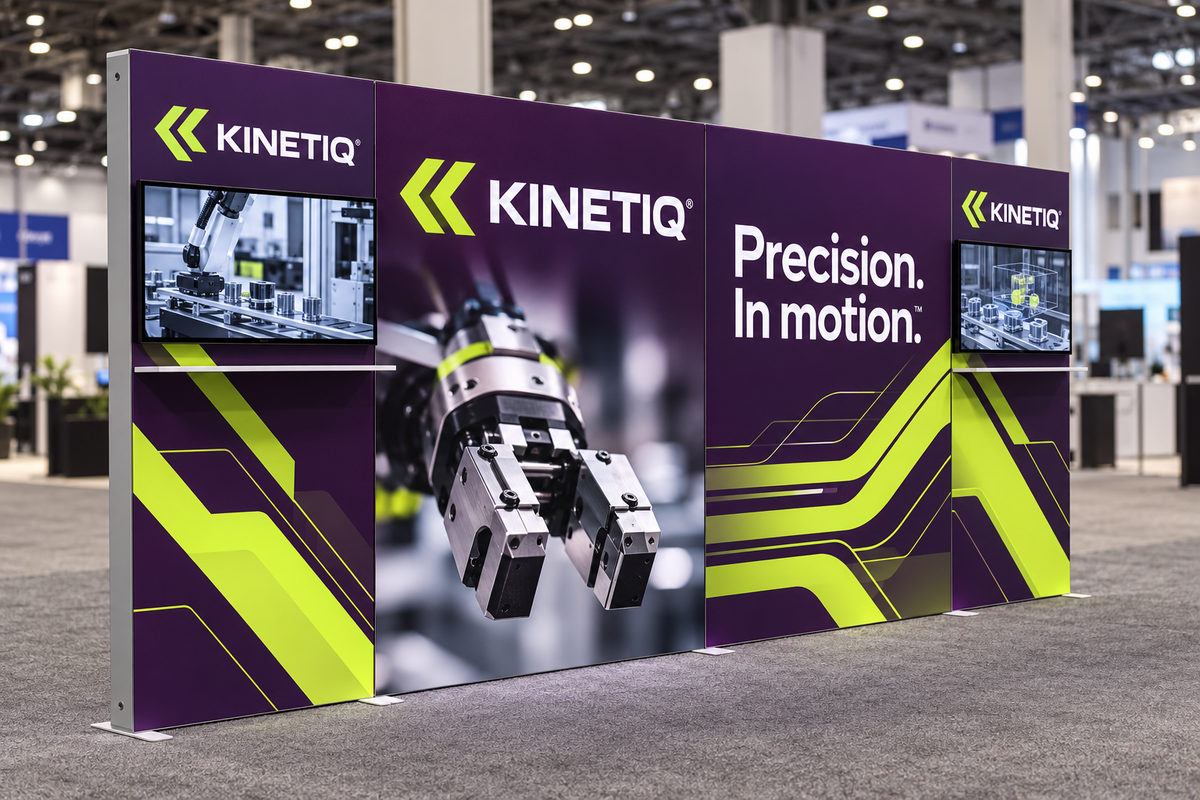
Two demo zones, one clear brand story
Aubergine and electric lime graphics connect the four-panel back wall, with demonstrations on the two existing TV positions.
View the display shown →Design around the way you meet people
Process demonstrations
Show a machine or workflow in action on screen when bringing the full equipment to the event is impractical.
Component and supplier exhibits
Use a large, clear component image to establish the application. Keep dense specifications in supporting materials.
Distributor and partner events
Give separate product lines their own screen content while retaining one consistent printed brand system.
Find the right display for your next event or space
Start with the job the display needs to do, then compare the exact dimensions, graphic options and included components.
SEGO LitBlocks - 20ft X 7.4ft Lightbox Display with TV Mounts
Two TV positions support separate applications, product lines or process demonstrations.
See sizes and options →SEGO LitBlocks - 10ft X 7.4ft Lightbox with TV Mount
A compact TV-ready wall supports one presentation in a standard 10x10 exhibit.
See sizes and options →SEGO LitBlocks - 20ft x 7.4ft Arch with Counter Lightbox Display
The arch-and-counter configuration creates an architectural introduction and branded conversation point.
See sizes and options →SEGO LitBlocks - 9.8ft Double-Sided Lightbox Display
A simple illuminated wall provides a backdrop while a separate, properly supported product demonstration takes focus.
See sizes and options →Artwork that works with backlighting
Show the component, process or application clearly enough to identify from the aisle. Use a short capability statement instead of printing a full specification sheet across the wall. Keep technical diagrams simple and use the screen for animation. Important labels should stay away from seams, frames and mounted electronics.
Build to the correct template using the LitBlocks artwork guidelines and backlit graphic design guide. Need a new campaign on an existing frame? See the replacement graphics guide.
Plan the complete space
Treat the lightbox as a graphic display, not a structural support for machinery. Plan heavy samples and equipment on suitable independent supports. Check the monitor mount specifications, electrical requirements and booth footprint before ordering. Include staff and visitor standing space around demonstrations, not just the dimensions of the backdrop.
Manufacturing & industrial display questions
Which display works for industrial process videos?
The 10ft TV-ready lightbox supports one presentation zone. The 20ft dual-TV wall offers two screen positions for separate processes or product lines; monitors are not included.
Can we attach heavy samples or equipment to the wall?
Do not assume the graphic frame can support equipment. Use suitable independent supports, and confirm any proposed accessory or load with LitBlocks before ordering.
Should detailed specifications be printed on the display?
Use the main wall for product identity and one clear capability message. Detailed specifications are easier to discuss in a handout, screen presentation or product document.
How do we choose between a flat wall and an arch?
Choose a flat wall when a clear backdrop and floor space are priorities. Consider an arch when you want more architectural definition and the verified footprint fits the event space.
Bring your brand into the picture
Tell us your display location, available space and campaign goals. We can help you choose a configuration and prepare artwork for the actual panels.
Plan your display Explore graphic design servicesKeep exploring
Browse the full design gallery or compare ideas for other industries.